
Table of Contents
Use Case #1 AV Shuttle
Autonomous Vehicle Validation through Scenario-Based Simulation and Domain Analysis
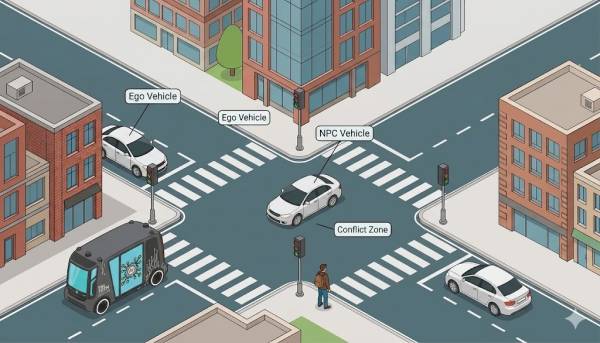
This use case is the final validation task of the autonomous vehicle practical course. It builds on the previous course sections, where students first learn Linux, Git, programming, and ROS 2; then perform TurtleBot mapping and autonomous navigation; then use Autoware for mission planning; and finally validate autonomous driving behavior using Autoware Software-in-the-Loop simulation, Scenario Simulator V2, OpenSCENARIO, Scenario Editor, and ScenarioModifiers.
The main purpose is to move students from simply running one autonomous driving scenario to performing a structured validation experiment. Students design an interactive traffic scenario, parameterize it, execute approximately 100 simulation variants, and analyze which parameter combinations lead to unsafe behavior. This follows the validation logic introduced in the SafeAV material: define an Operational Design Domain, generate test scenarios, execute them, and evaluate the results using clear correctness criteria. The SafeAV book describes this V&V process as a sequence of test generation, execution, and correctness evaluation, linked to ODD, coverage, and field-response reasoning.
I. Time and effort
This task is designed as an individual assignment and should be treated as a major practical validation exercise.
| Item | Recommendation |
|---|---|
| Estimated student effort | 12–18 hours |
| Recommended workload contribution | 4–5 CP equivalent, depending on the local credit model |
| Suggested calendar duration | 2 weeks after the Autoware and scenario simulation lectures |
| In-class preparation | 3–4 hours |
| Independent work | 9–14 hours |
| Assessment weight | 25 points total |
Suggested effort distribution:
| Activity | Estimated effort |
|---|---|
| Reviewing Autoware, Scenario Simulator V2, and Scenario Editor material | 2–3 h |
| Creating the base interactive scenario | 3–4 h |
| Editing YAML and adding ScenarioModifiers | 3–4 h |
| Running batch simulations | 3–5 h |
| Inspecting result files and failed .xosc cases | 3–4 h |
| Writing report and preparing GitHub repository | 4–5 h |
II. Resource requirements: hardware and software
Students use a Docker-based Autoware and Scenario Simulator V2 environment. The course material explicitly recommends Docker to avoid complex source installation issues and to simplify the setup of Autoware and the scenario simulator environment.
Minimum Hardware
- Ubuntu 22.04 host system, preferably native or dual boot rather than a low-resource virtual machine.
- 6-core CPU.
- 16 GB RAM minimum.
- 50 GB free disk space.
- Internet access for GitHub, Scenario Editor, and downloading required resources.
- Display support for RViz and graphical simulation tools.
Recommended Hardware
- 8-core CPU or better.
- 32 GB RAM.
- (Optional) Dedicated GPU or strong integrated graphics with Linux driver support.
- 100 GB free disk space.
- Stable wired or high-speed wireless network.
- Lab workstation or remote Linux server with GUI forwarding when available.
Software and Infrastructure
Required:
- Ubuntu 22.04.
- ROS 2 Humble.
- Docker.
- Autoware Docker image provided by the course.
- Autoware Universe / Autoware planning simulation environment.
- Scenario Simulator V2.
- scenario_test_runner.
- Scenario Editor online platform.
- OpenSCENARIO / YAML scenario files.
- ScenarioModifiers.
- Git and GitHub.
The ROS 2 material assumes Ubuntu 22.04 and ROS 2 Humble as the course baseline, and introduces workspaces, sourcing, nodes, topics, launch files, and `ros2_ws` structure as prerequisites. The Autoware material also uses a Docker workflow with mounted `ros2_ws` and `autoware_map` directories and a `setup.bash` file that sources ROS, Autoware, and the student workspace.
Students may work on their own laptops if the laptop satisfies the requirements. Otherwise, the recommended mode is to use lab workstations or remote servers prepared with the Docker image and maps. The Docker image is distributed through the course platform, so access to Moodle or the course repository is required. No commercial license is required for the core tools used in this task.
1. Prerequisite
Before starting this use case, students should already be able to:
- Use Linux terminal commands for file navigation, permissions, and troubleshooting.
- Use Git and GitHub to manage and submit their ros2_ws repository.
- Understand basic ROS 2 concepts: nodes, topics, services, launch files, workspaces, and package structure.
- Build and source a ROS 2 workspace.
- Understand TurtleBot mapping and navigation from earlier tasks.
- Understand the basic Autoware workflow: launching the planning simulator, setting initial pose, setting goal pose, and enabling autonomous navigation.
- Understand the role of simulation in AV validation.
- Read and modify YAML files.
The course prepares these skills progressively. The Linux and Git section introduces terminal commands and GitHub-based version control; the ROS 2 section introduces nodes, topics, workspaces, and launch files; the Autoware section introduces the planning simulator and Ego vehicle mission planning; and the validation section introduces Scenario Simulator V2, Scenario Editor, and OpenSCENARIO-based simulation.
2. Required Reading
- SafeAV book: Chapter 2.3, Introduction to Validation and Verification in Autonomy
Students should focus on the relationship between validation, Operational Design Domain, coverage, test generation, execution, and correctness criteria. This chapter explains that validation must demonstrate reasonable testing across the intended ODD, using generated scenarios, execution, and pass/fail criteria.
- SafeAV book: Chapter 2.4, Validation Requirements across Domains
Students should focus on why ground autonomous vehicles require scenario-based testing and how ODD boundaries, weather, infrastructure, regulation, and human-dense environments affect validation.
- SafeAV book: Chapter 6.3, Validation of Control and Planning
Students should focus on mission-level planning validation, trajectory safety outcomes, collisions, distance-to-collision violations, timeouts, and parameterized scenarios that stress planner thresholds.
- Course material: Autoware – Autonomous Vehicle Software
Students should review how to launch Autoware in Docker, start the planning simulator, set the initial pose, set the goal pose, and start autonomous navigation.
- Course material: Validation – Scenario Simulation
Students should review how Scenario Simulator V2 uses OpenSCENARIO, how the Scenario Editor is used, how predefined and custom scenarios are launched, and how post-simulation results are inspected.
- Task 4 PDF: AV Validation – Create and Simulate an Interactive Scenario
Students should read the full task description, especially the requirements for at least two NPCs, ScenarioModifiers, approximately 100 simulations, failure-boundary analysis, report sections, YAML submission, and GitHub structure.
3. Instruction on the Use Case
The instructor introduces the use case as the final step in the course's autonomy pipeline. The previous tasks show how to make a robot or Ego vehicle move autonomously. This task asks a different question: under which conditions does the autonomous driving stack fail, and how can we provide evidence for that conclusion?
The context is in three parts:
First, the instructor explains the validation motivation. In real autonomous vehicle development, it is not enough to show that the vehicle succeeds once. The system must be tested across a range of traffic situations. The students therefore create a base scenario and mutate key parameters such as Ego starting position, NPC trigger point, NPC speed, pedestrian delay, or timeout.
Second, the instructor explains the technical workflow: create scenario, export YAML, modify YAML paths and Ego configuration, add ScenarioModifiers, run batch simulation through scenario_test_runner, inspect results, identify failed cases, open failed .xosc files, extract parameter values, and define a failure boundary.
Third, the instructor explains the expected analysis. Students must not only report that some simulations failed. They must investigate why they failed and identify critical combinations, such as: Autoware fails when the NPC starts too close to the conflict point while Ego starts beyond a certain distance or speed condition.
Recommended teaching format:
- 45–60 min lecture on AV validation, ODD, scenario-based testing, and failure boundary.
- 45–60 min walkthrough of Scenario Editor and base scenario creation.
- 45–60 min walkthrough of YAML modification and ScenarioModifiers.
- 30–45 min demonstration of running the simulator and inspecting output files.
- 15–30 min discussion of report expectations and evaluation criteria.
4. Tools Introduction and Description
Autoware
Autoware is the autonomous driving stack under test. In this use case, students evaluate how Autoware behaves when the Ego vehicle is exposed to parameterized traffic interactions.
Scenario Simulator V2
Scenario Simulator V2 is the simulation framework used to execute OpenSCENARIO-based traffic scenarios with Autoware. It can simulate predefined traffic scenarios, validate planning and control modules, and generate machine-readable scenarios for Autoware.
Scenario Editor
Scenario Editor [https://scenario.ci.tier4.jp/] is an online tool for creating and modifying OpenSCENARIO files for Autoware simulation. Students use it to import a Lanelet2 map, place Ego and NPC actors, define interactions, and export the scenario as a YAML file. Google Chrome is recommended for compatibility.
OpenSCENARIO / YAML Scenario Files
The exported YAML file represents the traffic scenario. Students modify this file manually to fix map paths, configure the Ego vehicle, remove unnecessary parts if required, and add ScenarioModifiers.
ScenarioModifiers
ScenarioModifiers are used to replace fixed scenario values with variables. These variables can be defined as ranges or lists to automatically generate many scenario variations. Task 4 requires students to use both lists and ranges and target approximately 100 simulation variants.
Docker
Docker provides the preconfigured environment containing Autoware and Scenario Simulator V2. Students use the provided Docker image and shell script, such as autoware_terminal.sh, to enter the environment.
GitHub
GitHub is used for assignment delivery. Each student must submit a public repository containing the final parameterized YAML file, relevant configuration files, and documentation. The YAML file must be placed in a folder named scenario inside the ros2_ws repository.
Online Assessor
An online assessor is used to score the submitted report according to the defined rubric. The assessor should be treated as a formative and summative support tool: students may use it to check whether their draft addresses the required sections, but the final responsibility for correctness, technical explanation, evidence, and originality remains with the student.
5. Demonstration of Example
The instructor demonstrates a small end-to-end example before students begin their own work. The example should be intentionally simple but complete.
- Open Scenario Editor in Google Chrome.

- Import the Lanelet2 map used in the course.
- Place the Ego vehicle at an initial position before a junction.
- Add two NPCs:
- NPC1: a vehicle approaching the same junction from a crossing lane.
- NPC2: a pedestrian or second vehicle crossing or entering the conflict zone after a delay.
- Define a realistic interaction:
- Ego drives toward an intersection.
- NPC1 enters from the side road.
- NPC2 crosses after a delay.
- A collision risk appears if timing and distance are unfavorable.
- Export the scenario as YAML.
- Modify the YAML:
- update RoadNetwork / LogicFile map path;
- ensure Ego is configured as isEgo: true for Autoware-in-the-loop execution;
- remove unsupported or unnecessary elements if required;
- add a small ScenarioModifiers block.
ScenarioModifiers:
  ScenarioModifier:
   # Range Sweep: (35-15)/2 = 11 variations
   - { name: EGO_START_S, start: 15, step: 2, stop: 35 }
   # Range Sweep: (45-38)/1 = 8 variations
   - { name: NPC1_TRIGGER_S, start: 38, step: 1, stop: 45 }
   # List: 2 variations
   - name: NPC2_DELAY
   list: [1, 5]
- Run a short batch test, for example 12–20 variants, before showing the full 100-variant requirement.

- Open result.junit.xml and identify failed scenario indices.
- Open one failed .xosc file and extract the parameter values that caused the failure.
- Create a small risk table with columns such as scenario index, Ego start position, NPC trigger point, NPC delay, result, and observed failure.
The instructor should explicitly connect this example to the Task 4 expectation: students must design their own scenario, use at least two NPCs, run approximately 100 variants, and identify a failure boundary.
6. Task Description
Each student must design, execute, and analyze an autonomous vehicle validation experiment using Autoware Scenario Simulator V2.
The student must create an interactive traffic scenario in Scenario Editor. The scenario must include:
- Ego vehicle controlled by Autoware.
- At least two NPCs, such as vehicles or pedestrians.
- A realistic interaction, such as yielding, crossing, merging, turning across traffic, or a collision-risk situation at an intersection or T-junction.
- A clear validation objective: for example, determining when Autoware fails to avoid a collision or cannot safely complete the mission.
The student must export the scenario as YAML and modify it to support batch validation. Instead of hardcoding all values, the student must define ScenarioModifiers for approximately 100 simulations. The variables should represent meaningful domain parameters, such as:
- Ego initial longitudinal position.
- NPC trigger distance.
- NPC speed.
- Pedestrian start delay.
- Ego goal distance.
- Timeout limit.
- Lane or route option.
A successful minimum submission includes:
- A working interactive scenario with at least two NPCs.
- A parameterized YAML file with ScenarioModifiers.
- Successful execution of multiple mutated simulations, not only one scenario.
- Analysis of result files and failed .xosc cases.
- A defined failure boundary or critical threshold.
- A detailed report.
- A public GitHub repository with the YAML file in ros2_ws/scenario.
Main simulation command:
ros2 launch scenario_test_runner scenario_test_runner.launch.py \
architecture_type:=awf/universe record:=false \
scenario:='/autoware_map/scenarios/your_scenario.yaml' \
sensor_model:=sample_sensor_kit vehicle_model:=sample_vehicle \
output_directory:='/autoware_map/results' \
global_real_time_factor:=5.0 launch_rviz:=false use_sim_time:=true
If Autoware behaves erratically, students may reduce global_real_time_factor to 2.0 or 3.0.
7. Development of the Task
Mandatory Development
Students must complete the following mandatory parts:
- Create a base interactive scenario using Scenario Editor.
- Include at least two NPCs.
- Export and modify the YAML file.
- Add ScenarioModifiers using both ranges and lists.
- Generate approximately 100 scenario variations.
- Run the simulations with Autoware in the loop.
- Analyze result.junit.xml.
- Inspect failed .xosc files.
- Identify at least one dangerous failed case in detail.
- Define a failure boundary or critical threshold.
- Submit a structured report and GitHub repository.
Optional Extensions for Higher Quality Work
Students can deepen the task by:
- Increasing the number of parameters from two to four.
- Comparing two different interaction types, such as vehicle crossing versus pedestrian crossing.
- Plotting a risk table or heat map showing safe and unsafe parameter regions.
- Running a small sensitivity analysis to identify which parameter most strongly affects failure.
- Comparing two real-time factors and discussing simulation stability.
- Adding clearer comments inside the YAML file explaining each parameter.
- Adding helper scripts to parse .xosc or result files.
- Including a README with exact reproduction commands.
- Discussing limitations of simulation-based validation and how the experiment relates to ODD coverage.
Optional extensions improve the grade only after the mandatory requirements are satisfied.
8. Decision on Group Work
This use case is an individual task.
Each student must submit their own report, their own scenario design, their own parameterized YAML file, their own simulation results, and their own GitHub repository link. Students may discuss general tool usage and troubleshooting with classmates, but the scenario design, YAML parameterization, analysis, and written report must be individually produced.
The scope is intentionally limited to approximately 100 simulation variants so that the task is feasible for one student while still requiring real validation reasoning.
9. Reporting and Evaluation
Students submit:
- Detailed report.
- Public GitHub repository link.
- Final parameterized YAML scenario file.
- Relevant configuration files or helper scripts.
- Evidence of simulation execution.
- Results analysis and failed scenario investigation.
The report must include the following sections:
1. Introduction
Explain the task, validation objective, and why scenario-based simulation is used.
2. Scenario Creation
Describe the selected map, traffic situation, Ego route, NPC actors, and interactions. Include screenshots from Scenario Editor.
3. YAML Modifications
Explain path corrections, Ego configuration, removed or edited blocks, and all ScenarioModifiers. Explain why each variable was chosen.
4. Simulation Process
Show the exact launch command, real-time factor, output directory, Docker environment, and any troubleshooting steps.
5. Results and Analysis
Summarize the number of total simulations, number of passed and failed cases, percentage of failures, failed indices, and key observations.
6. Domain Analysis and Failure Boundary
Identify the critical parameter combinations that lead to unsafe behavior. This must be based on result files and .xosc inspection.
7. Failed Scenario Investigation
Analyze at least one failed scenario in detail. Include the parameter values and explain why the situation became dangerous.
8. Conclusion
Summarize what was learned, limitations of the experiment, and possible improvements.
9. GitHub Link
Provide the public repository link. The final YAML file must be placed inside a folder named scenario in the ros2_ws repository.
The report should also include a short time and cost reflection, including:
- approximate time spent on setup, scenario creation, simulation, analysis, and reporting;
- hardware used;
- whether the work was performed on a personal laptop, lab machine, or remote server;
- any practical cost or infrastructure limitation, such as compute time, storage, or failed simulation reruns.
10. Evaluation Criteria
Total: 25 points
1. Report Structure and Completeness -- 4 points
The report must be clearly structured and include all required sections: introduction, scenario creation, YAML modifications, simulation process, results and analysis, conclusion, and GitHub link. The content must be logically organized and directly correspond to the assignment objectives.
| Score | Description |
|---|---|
| 4 points | All required sections are present, clearly structured, technically meaningful, and logically connected. |
| 2–3 points | Most sections are present, but structure is partially incomplete, unclear, or weakly developed. |
| 0–1 points | Major sections are missing, the document lacks logical organization, or the report does not correspond to the assignment. |
2. Scenario Design and Interactive Behavior -- 4 points
The student must create an interactive traffic scenario using Scenario Editor with at least two NPCs, such as vehicles or pedestrians. The interaction must be realistic and relevant to AV validation.
| Score | Description |
|---|---|
| 4 points | Scenario is realistic, includes at least two meaningful NPC interactions, and is clearly documented with visual evidence. |
| 2–3 points | Scenario is functional but simplistic, weakly explained, or only partially realistic. |
| 0–1 points | Scenario is incomplete, unrealistic, missing NPC interaction, or not documented. |
3. Parameterized Scenario and YAML Configuration -- 5 points
The YAML file must include correctly implemented ScenarioModifiers using ranges and lists to generate approximately 100 variations. Students must show understanding of parameterized testing rather than hardcoded values.
| Score | Description |
|---|---|
| 5 points | YAML is technically correct, uses ranges and lists properly, generates approximately 100 meaningful variations, includes valid variable definitions, valid simulation parameters, and correct paths. Explanation is specific and technically grounded. |
| 3–4 points | Parameterization is mostly correct but incomplete, weakly explained, or produces a less convincing set of variations. |
| 1–2 points | Mutation logic is limited, incorrect, mostly hardcoded, or poorly explained. |
| 0 points | YAML configuration is missing or does not implement parameterized scenarios. |
If AI tools are used to help generate or debug YAML, the usage must be clearly indicated and accompanied by student explanation and comments. Generic AI-generated explanations are not sufficient for full credit.
4. Simulation Execution and Autoware Integration -- 4 points
The student must execute batch simulations using Autoware Scenario Simulator V2 and demonstrate understanding of the workflow.
| Score | Description |
|---|---|
| 4 points | Multiple mutated simulations are successfully executed; launch command, real-time factor, output directory, and configuration are clearly explained; the process is reproducible. |
| 2–3 points | Simulation is partially successful or insufficiently documented. |
| 0–1 points | Simulation process is missing, incorrect, only a single scenario is run, or results are not reproducible. |
5. Domain Analysis and Risk Investigation -- 5 points
The report must include meaningful analysis of the simulation results. Students must analyze failed scenarios using generated .xosc and result files, identify failure patterns, and define a failure boundary or critical threshold.
| Score | Description |
|---|---|
| 5 points | Detailed technical analysis supported by evidence; failure boundary is clearly defined; at least one failed case is investigated in depth; dangerous parameter combinations are explained. |
| 3–4 points | Analysis is mostly correct but lacks depth, evidence, or clear threshold definition. |
| 1–2 points | Analysis is superficial, generic, or weakly connected to simulation results. |
| 0 points | Analysis is missing. |
6. GitHub Repository and Project Completeness -- 3 points
The submission must include a public GitHub repository containing the final parameterized YAML file, relevant configuration files, and any additional code used.
| Score | Description |
|---|---|
| 3 points | Repository is complete, well organized, reproducible, and includes the YAML file inside ros2_ws/scenario. |
| 1–2 points | Repository is partially complete, missing documentation, or not fully reproducible. |
| 0 points | Repository, YAML file, or required scenario folder is missing. |
11. AI
Students may use AI tools as assistive tools, not as replacements for engineering work.
Permitted AI use:
- brainstorming possible traffic interactions;
- improving report language;
- explaining YAML syntax;
- suggesting debugging strategies;
- helping interpret error messages;
- generating draft tables or report outlines;
- checking whether a report section is clear.
Not permitted:
- submitting AI-generated analysis without verifying it against simulation outputs;
- inventing simulation results;
- using AI to fabricate screenshots, .xosc data, or failure evidence;
- submitting YAML that the student cannot explain;
- hiding AI usage when it contributed to YAML, code, or report text.
Students must include a short AI usage statement in the report, for example:
AI tools were used to improve the wording of the report and to help debug YAML syntax. All simulation results, screenshots, parameter values, and analysis were produced and verified by the student.
The online assessor may be used as a formative feedback tool before final submission. Its role is to check alignment with the rubric and identify missing sections or weak explanations. The final grade is still based on the submitted technical evidence, scenario files, simulation results, and report quality.
12. External Material or Dataset
Lanelet2 Map
Students use a Lanelet2 map supported by the Scenario Editor and Scenario Simulator V2. The map is imported into the Scenario Editor and referenced by the scenario YAML file.
Autoware Map Directory
The course Autoware workflow uses an autoware_map directory mounted into Docker. The scenario, map files, generated results, and output data should be organized in this directory according to the course instructions.
Scenario Editor Online Platform
Used to create and export the base scenario.
Autoware + Scenario Simulator Docker Image
The Docker image is provided through the course platform. It contains the required Autoware and scenario simulation stack.
GitHub Repository
Each student uses GitHub as the submission and reproducibility platform.
Generated Simulation Outputs
The student-generated output dataset includes:
- result.junit.xml;
- generated .xosc files;
- simulator output folders;
- screenshots;
- logs, if available.
These generated outputs are not external datasets but are essential evidence for the validation report.
Final Use Case Summary
This use case teaches students how autonomous vehicle validation differs from simple demonstration. A single successful run is not enough. Students must define a traffic interaction, parameterize the scenario, execute many simulation variants, inspect failures, and identify the boundary between safe and unsafe behavior. The task connects practical Autoware simulation skills with the SafeAV validation concepts of Operational Design Domain, scenario generation, execution, correctness criteria, coverage, and failure analysis.


